#34833: "Board positioning: avoid requiring scrolling where possible"
Čeho se toto hlášení týká?
Co se stalo? Prosím vyberte níže
Co se stalo? Prosím vyberte níže
Prosím zkontroluj, zda již neexistuje hlášení pro stejnou věc
Pokud ano, HLASUJ pro toto hlášení. Hlášení s nejvyšším počtem hlasů budou řešena PŘEDNOSTNĚ!
| # | Status | Votes | Game | Type | Title | Last update |
|---|
Detailní popis
-
• Prosím, zkopíruj a vlož hlášení o chybě, které vidíš na monitoru, pokud to lze.
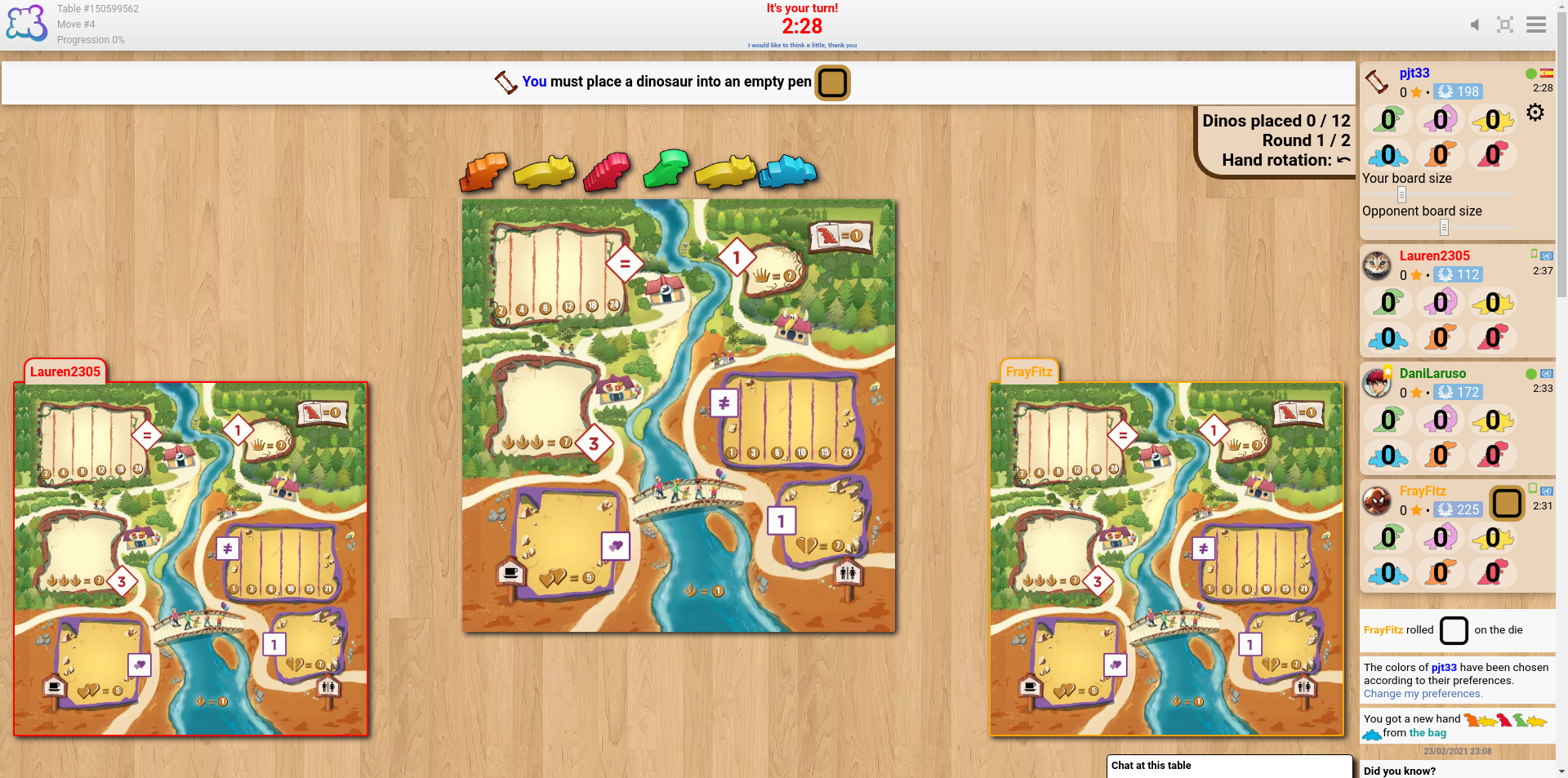
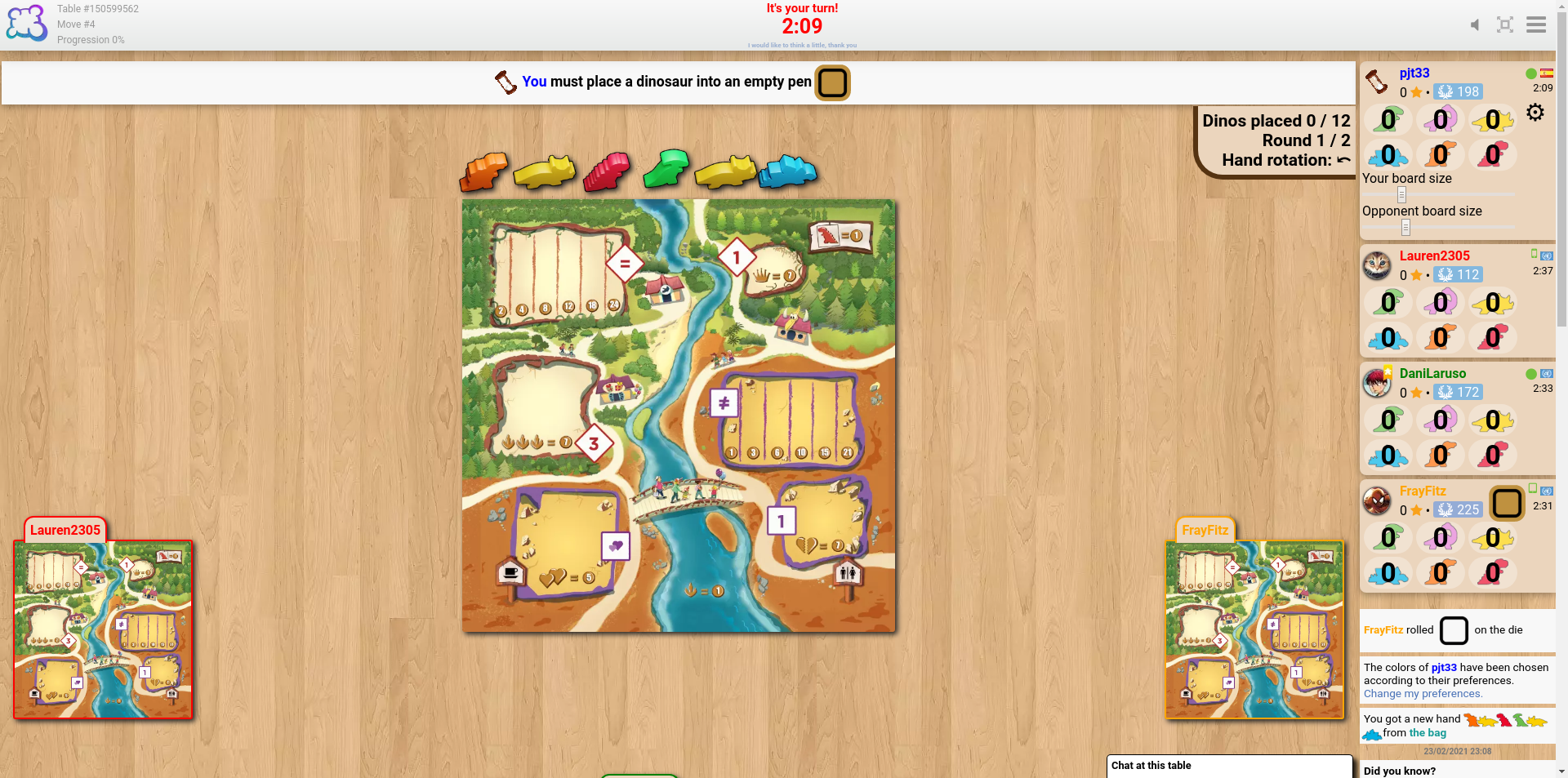
The sliders to change the sizes of the boards seem like a good idea, but my experience of trying to find a suitable size is that the problem isn't the board size but their position. It seems that the boards of the players to my left and right align with the bottom of the screen, and the boards of the fourth (and fifth, if applicable) player(s) go below the bottom of the screen unless using really tiny sizes.
cheddarmonk.org/forumimg/draftosaurus-initial-sizes.png and cheddarmonk.org/forumimg/draftosaurus-aligns-bottom.png show how making the opponent boards smaller pushes them down.
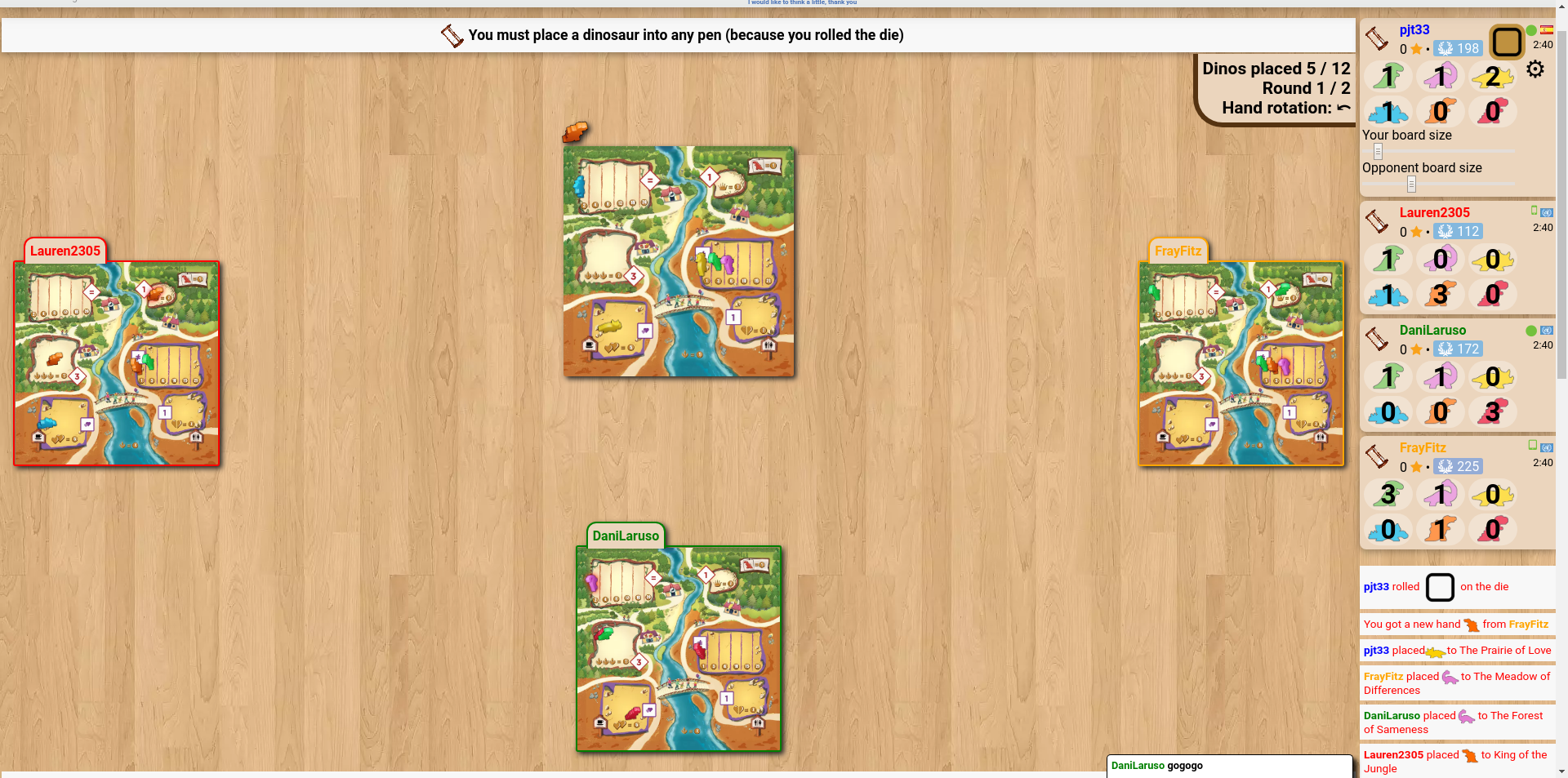
cheddarmonk.org/forumimg/draftosaurus-fixed-margin.png was the best that I could manage to get the boards to fit on screen without scrolling, and even then I had to scroll down a little and lose some of the header. This is with a maximised browser window on a 1920x1080 screen.
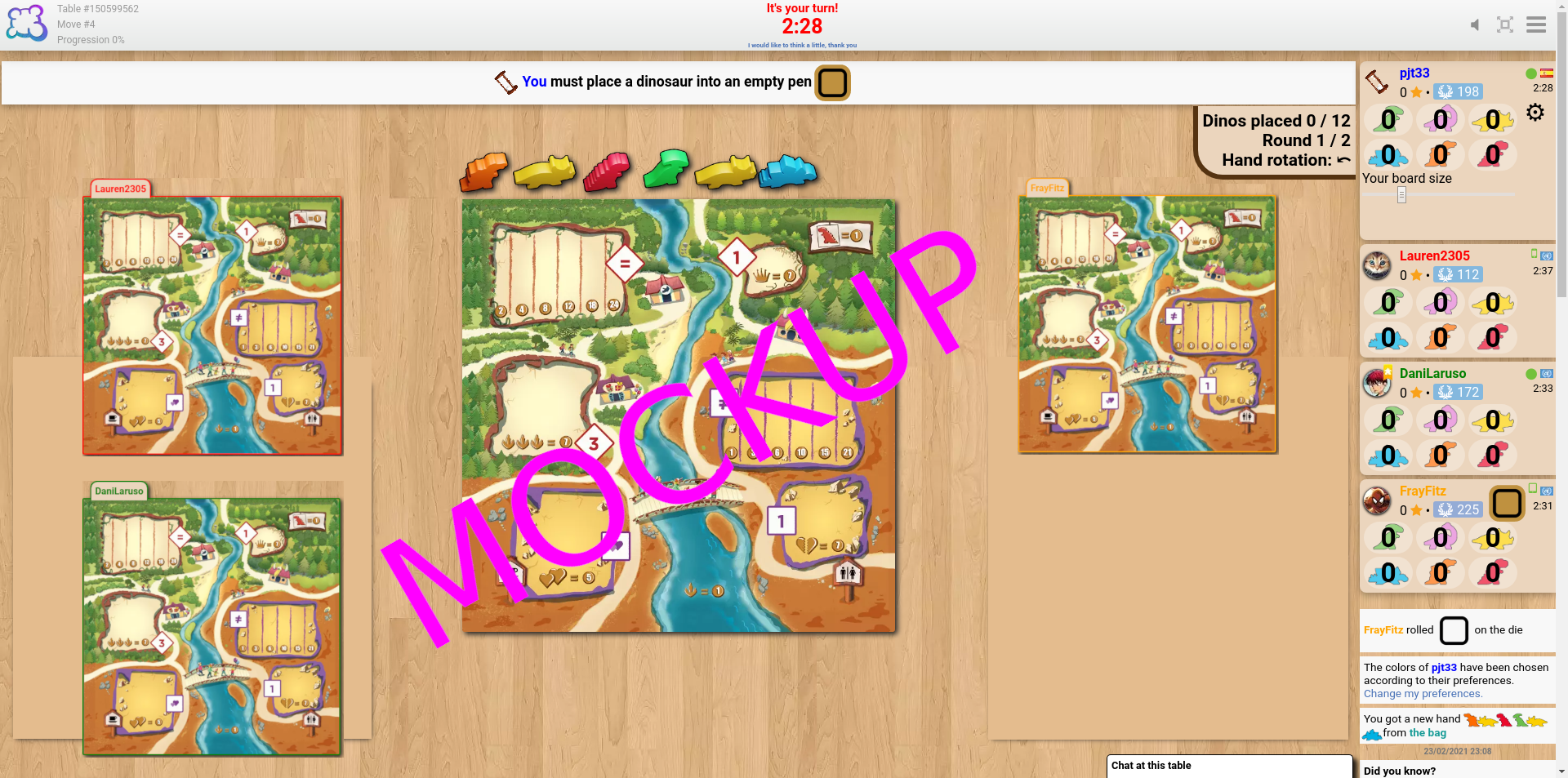
For desktop I think that it would work to have just one slider, for my own board size, and to fit the opponent boards into the left and right margins by calculating the scale factor which lets them both fit vertically, and the scale factor which lets them fit horizontally, and choosing the smaller of the two. I've made a mockup at cheddarmonk.org/forumimg/draftosaurus-mockup.png which shows how much larger the boards can be without scrolling. -
• Prosím popiš, co jsi měl v úmyslu udělat, co jsi udělal a co se nakonec stalo
• Jaký prohlížeč používáte?
Google Chrome v79
-
• Prosíme, zkopíruj/vlož text zobrazený v angličtině namísto tvého jazyka. Pokud máš snímek obrazovky tohoto bugu (doporučený postup), můžeš použít libovolnou službu pro hostování obrázků (například snipboard.io), nahrát ho tam a odkaz sem zkopírovat/vložit. Je tento text k dispozici v systému pro překládání? Pokud ano, byl přeložen před více než 24 hodinami?
The sliders to change the sizes of the boards seem like a good idea, but my experience of trying to find a suitable size is that the problem isn't the board size but their position. It seems that the boards of the players to my left and right align with the bottom of the screen, and the boards of the fourth (and fifth, if applicable) player(s) go below the bottom of the screen unless using really tiny sizes.
cheddarmonk.org/forumimg/draftosaurus-initial-sizes.png and cheddarmonk.org/forumimg/draftosaurus-aligns-bottom.png show how making the opponent boards smaller pushes them down.
cheddarmonk.org/forumimg/draftosaurus-fixed-margin.png was the best that I could manage to get the boards to fit on screen without scrolling, and even then I had to scroll down a little and lose some of the header. This is with a maximised browser window on a 1920x1080 screen.
For desktop I think that it would work to have just one slider, for my own board size, and to fit the opponent boards into the left and right margins by calculating the scale factor which lets them both fit vertically, and the scale factor which lets them fit horizontally, and choosing the smaller of the two. I've made a mockup at cheddarmonk.org/forumimg/draftosaurus-mockup.png which shows how much larger the boards can be without scrolling. • Jaký prohlížeč používáte?
Google Chrome v79
-
• Prosím popiš svůj návrh přesně a konzistentně, aby bylo snadné pochopit, co máš na mysli.
The sliders to change the sizes of the boards seem like a good idea, but my experience of trying to find a suitable size is that the problem isn't the board size but their position. It seems that the boards of the players to my left and right align with the bottom of the screen, and the boards of the fourth (and fifth, if applicable) player(s) go below the bottom of the screen unless using really tiny sizes.
cheddarmonk.org/forumimg/draftosaurus-initial-sizes.png and cheddarmonk.org/forumimg/draftosaurus-aligns-bottom.png show how making the opponent boards smaller pushes them down.
cheddarmonk.org/forumimg/draftosaurus-fixed-margin.png was the best that I could manage to get the boards to fit on screen without scrolling, and even then I had to scroll down a little and lose some of the header. This is with a maximised browser window on a 1920x1080 screen.
For desktop I think that it would work to have just one slider, for my own board size, and to fit the opponent boards into the left and right margins by calculating the scale factor which lets them both fit vertically, and the scale factor which lets them fit horizontally, and choosing the smaller of the two. I've made a mockup at cheddarmonk.org/forumimg/draftosaurus-mockup.png which shows how much larger the boards can be without scrolling. • Jaký prohlížeč používáte?
Google Chrome v79
-
• Co bylo zobrazeno na monitoru, když došlo k tvému zablokování? (Černá obrazovka? Část herního prostředí? Hlášení o chybě?)
The sliders to change the sizes of the boards seem like a good idea, but my experience of trying to find a suitable size is that the problem isn't the board size but their position. It seems that the boards of the players to my left and right align with the bottom of the screen, and the boards of the fourth (and fifth, if applicable) player(s) go below the bottom of the screen unless using really tiny sizes.
cheddarmonk.org/forumimg/draftosaurus-initial-sizes.png and cheddarmonk.org/forumimg/draftosaurus-aligns-bottom.png show how making the opponent boards smaller pushes them down.
cheddarmonk.org/forumimg/draftosaurus-fixed-margin.png was the best that I could manage to get the boards to fit on screen without scrolling, and even then I had to scroll down a little and lose some of the header. This is with a maximised browser window on a 1920x1080 screen.
For desktop I think that it would work to have just one slider, for my own board size, and to fit the opponent boards into the left and right margins by calculating the scale factor which lets them both fit vertically, and the scale factor which lets them fit horizontally, and choosing the smaller of the two. I've made a mockup at cheddarmonk.org/forumimg/draftosaurus-mockup.png which shows how much larger the boards can be without scrolling. • Jaký prohlížeč používáte?
Google Chrome v79
-
• Která část pravidel nebyla dodržena adaptací hry na BGA
The sliders to change the sizes of the boards seem like a good idea, but my experience of trying to find a suitable size is that the problem isn't the board size but their position. It seems that the boards of the players to my left and right align with the bottom of the screen, and the boards of the fourth (and fifth, if applicable) player(s) go below the bottom of the screen unless using really tiny sizes.
cheddarmonk.org/forumimg/draftosaurus-initial-sizes.png and cheddarmonk.org/forumimg/draftosaurus-aligns-bottom.png show how making the opponent boards smaller pushes them down.
cheddarmonk.org/forumimg/draftosaurus-fixed-margin.png was the best that I could manage to get the boards to fit on screen without scrolling, and even then I had to scroll down a little and lose some of the header. This is with a maximised browser window on a 1920x1080 screen.
For desktop I think that it would work to have just one slider, for my own board size, and to fit the opponent boards into the left and right margins by calculating the scale factor which lets them both fit vertically, and the scale factor which lets them fit horizontally, and choosing the smaller of the two. I've made a mockup at cheddarmonk.org/forumimg/draftosaurus-mockup.png which shows how much larger the boards can be without scrolling. -
• Je vidět porušení pravidel na záznamu hry? Pokud ano, ve kterém tahu?
• Jaký prohlížeč používáte?
Google Chrome v79
-
• O jakou herní akci ses pokoušel/a?
The sliders to change the sizes of the boards seem like a good idea, but my experience of trying to find a suitable size is that the problem isn't the board size but their position. It seems that the boards of the players to my left and right align with the bottom of the screen, and the boards of the fourth (and fifth, if applicable) player(s) go below the bottom of the screen unless using really tiny sizes.
cheddarmonk.org/forumimg/draftosaurus-initial-sizes.png and cheddarmonk.org/forumimg/draftosaurus-aligns-bottom.png show how making the opponent boards smaller pushes them down.
cheddarmonk.org/forumimg/draftosaurus-fixed-margin.png was the best that I could manage to get the boards to fit on screen without scrolling, and even then I had to scroll down a little and lose some of the header. This is with a maximised browser window on a 1920x1080 screen.
For desktop I think that it would work to have just one slider, for my own board size, and to fit the opponent boards into the left and right margins by calculating the scale factor which lets them both fit vertically, and the scale factor which lets them fit horizontally, and choosing the smaller of the two. I've made a mockup at cheddarmonk.org/forumimg/draftosaurus-mockup.png which shows how much larger the boards can be without scrolling. -
• Co ses pokoušel/a udělat, abys spustil/a tuhle herní akci?
-
• Co se stalo, když ses o tuto akci pokusil/a (vyskočila chybová hláška, lišta ve hře, ...)?
• Jaký prohlížeč používáte?
Google Chrome v79
-
• V jaké fázi hry problém nastal (jaký byl poslední herní pokyn)?
The sliders to change the sizes of the boards seem like a good idea, but my experience of trying to find a suitable size is that the problem isn't the board size but their position. It seems that the boards of the players to my left and right align with the bottom of the screen, and the boards of the fourth (and fifth, if applicable) player(s) go below the bottom of the screen unless using really tiny sizes.
cheddarmonk.org/forumimg/draftosaurus-initial-sizes.png and cheddarmonk.org/forumimg/draftosaurus-aligns-bottom.png show how making the opponent boards smaller pushes them down.
cheddarmonk.org/forumimg/draftosaurus-fixed-margin.png was the best that I could manage to get the boards to fit on screen without scrolling, and even then I had to scroll down a little and lose some of the header. This is with a maximised browser window on a 1920x1080 screen.
For desktop I think that it would work to have just one slider, for my own board size, and to fit the opponent boards into the left and right margins by calculating the scale factor which lets them both fit vertically, and the scale factor which lets them fit horizontally, and choosing the smaller of the two. I've made a mockup at cheddarmonk.org/forumimg/draftosaurus-mockup.png which shows how much larger the boards can be without scrolling. -
• Co se stalo, když ses pokusil/a udělat akci (chybová hláška, oznámení stavového řádku hry, ...)?
• Jaký prohlížeč používáte?
Google Chrome v79
-
• Prosím popište vyobrazený problém. Pokud máš snímek obrazovky tohoto bugu (doporučený postup), můžeš použít libovolnou službu pro hostování obrázků (například snipboard.io), nahrát ho tam a odkaz sem zkopírovat/vložit.
The sliders to change the sizes of the boards seem like a good idea, but my experience of trying to find a suitable size is that the problem isn't the board size but their position. It seems that the boards of the players to my left and right align with the bottom of the screen, and the boards of the fourth (and fifth, if applicable) player(s) go below the bottom of the screen unless using really tiny sizes.
cheddarmonk.org/forumimg/draftosaurus-initial-sizes.png and cheddarmonk.org/forumimg/draftosaurus-aligns-bottom.png show how making the opponent boards smaller pushes them down.
cheddarmonk.org/forumimg/draftosaurus-fixed-margin.png was the best that I could manage to get the boards to fit on screen without scrolling, and even then I had to scroll down a little and lose some of the header. This is with a maximised browser window on a 1920x1080 screen.
For desktop I think that it would work to have just one slider, for my own board size, and to fit the opponent boards into the left and right margins by calculating the scale factor which lets them both fit vertically, and the scale factor which lets them fit horizontally, and choosing the smaller of the two. I've made a mockup at cheddarmonk.org/forumimg/draftosaurus-mockup.png which shows how much larger the boards can be without scrolling. • Jaký prohlížeč používáte?
Google Chrome v79
-
• Prosíme, zkopíruj/vlož text zobrazený v angličtině namísto tvého jazyka. Pokud máš snímek obrazovky tohoto bugu (doporučený postup), můžeš použít libovolnou službu pro hostování obrázků (například snipboard.io), nahrát ho tam a odkaz sem zkopírovat/vložit. Je tento text k dispozici v systému pro překládání? Pokud ano, byl přeložen před více než 24 hodinami?
The sliders to change the sizes of the boards seem like a good idea, but my experience of trying to find a suitable size is that the problem isn't the board size but their position. It seems that the boards of the players to my left and right align with the bottom of the screen, and the boards of the fourth (and fifth, if applicable) player(s) go below the bottom of the screen unless using really tiny sizes.
cheddarmonk.org/forumimg/draftosaurus-initial-sizes.png and cheddarmonk.org/forumimg/draftosaurus-aligns-bottom.png show how making the opponent boards smaller pushes them down.
cheddarmonk.org/forumimg/draftosaurus-fixed-margin.png was the best that I could manage to get the boards to fit on screen without scrolling, and even then I had to scroll down a little and lose some of the header. This is with a maximised browser window on a 1920x1080 screen.
For desktop I think that it would work to have just one slider, for my own board size, and to fit the opponent boards into the left and right margins by calculating the scale factor which lets them both fit vertically, and the scale factor which lets them fit horizontally, and choosing the smaller of the two. I've made a mockup at cheddarmonk.org/forumimg/draftosaurus-mockup.png which shows how much larger the boards can be without scrolling. • Jaký prohlížeč používáte?
Google Chrome v79
-
• Prosím popiš svůj návrh přesně a konzistentně, aby bylo snadné pochopit, co máš na mysli.
The sliders to change the sizes of the boards seem like a good idea, but my experience of trying to find a suitable size is that the problem isn't the board size but their position. It seems that the boards of the players to my left and right align with the bottom of the screen, and the boards of the fourth (and fifth, if applicable) player(s) go below the bottom of the screen unless using really tiny sizes.
cheddarmonk.org/forumimg/draftosaurus-initial-sizes.png and cheddarmonk.org/forumimg/draftosaurus-aligns-bottom.png show how making the opponent boards smaller pushes them down.
cheddarmonk.org/forumimg/draftosaurus-fixed-margin.png was the best that I could manage to get the boards to fit on screen without scrolling, and even then I had to scroll down a little and lose some of the header. This is with a maximised browser window on a 1920x1080 screen.
For desktop I think that it would work to have just one slider, for my own board size, and to fit the opponent boards into the left and right margins by calculating the scale factor which lets them both fit vertically, and the scale factor which lets them fit horizontally, and choosing the smaller of the two. I've made a mockup at cheddarmonk.org/forumimg/draftosaurus-mockup.png which shows how much larger the boards can be without scrolling. • Jaký prohlížeč používáte?
Google Chrome v79
Historie hlášení
I think laying our the boards in the same way as the game Lucky Numbers would be beneficial, as all of the boards are the same size and can be viewed at once without either resizing or scrolling.
Doplňte tuto zprávu
- ID dalšího stolu / ID tahu
- Byla chyba odstraněna stisknutím F5?
- Objevila se tato chyba častěji? Pokaždé? Náhodně?
- Pokud máš snímek obrazovky tohoto bugu (doporučený postup), můžeš použít libovolnou službu pro hostování obrázků (například snipboard.io), nahrát ho tam a odkaz sem zkopírovat/vložit.